With the appearance of AI visual generating tools, many graphic designers fear losing their job. Rather than continuing the never-ending debate on whether AI will replace designers, let's shift our focus toward something more practical. Present AI solutions such as ChatGPT can prove to be immensely useful in our day-to-day tasks. You would be surprised to know the extent of topics that can be enhanced by this tool. In this article, we will go through several practical examples concerning the UI/UX design process.
So, let's dive right in!
1. Create a website or section copy!
While using "lorem ipsum" may be convenient, it still makes the design look incomplete. A better way to visualize the design and showcase even the initial versions to clients is by incorporating a sample copy. AI tools can generate fairly decent examples of textual content.
2. Enhance existing copy!
In case you feel that the text content is not quite right, you can ask ChatGPT to optimize it. However, it is important to note that there are limitations to the level of optimization, and the text may begin to appear overly generic.
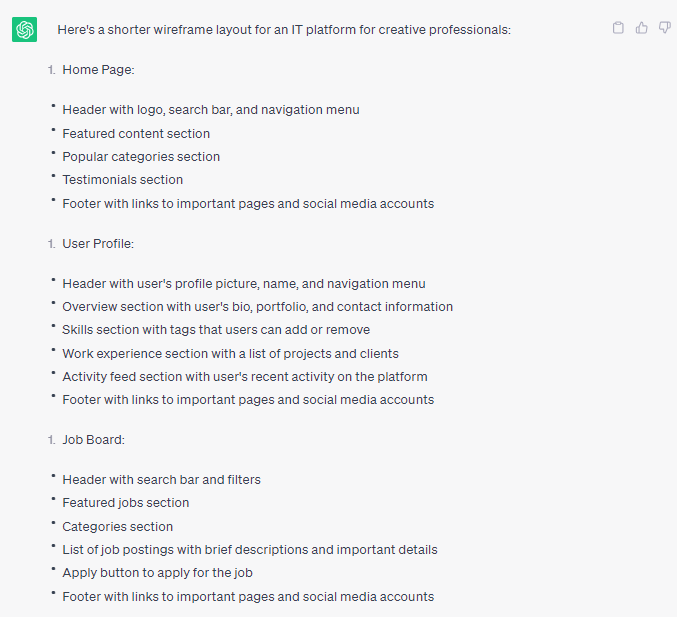
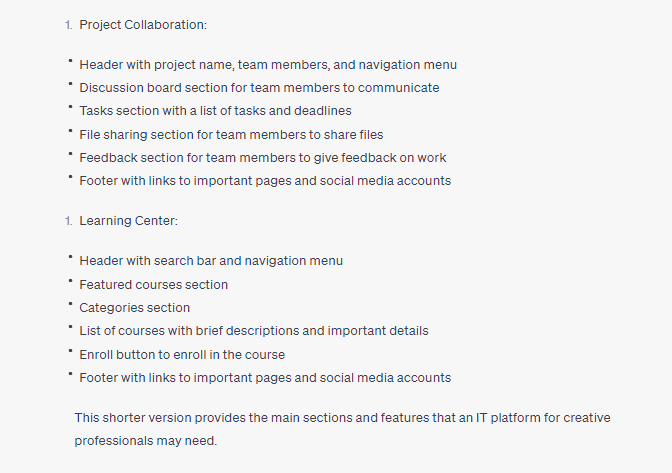
3. Generate ideas for page layout or wireframe!
If you're working with a tight deadline or feeling creatively stuck, you can use AI to receive a description of a wireframe for a particular layout. Some of the results may surprise you with their effectiveness.
4. Identify appropriate usability testing methods for specific apps or websites!
Selecting the right usability testing method can drastically improve the product. You can ask ChatGPT to recommend some of the best methods for your project.
5. Receive suggestions to optimize your design workflow!
If you enjoy learning and improving your skills, AI tools can recommend exploring new workflow elements, such as handoff.
6. Discover the best tools for learning!
The design industry is rapidly evolving, and new tech possibilities present opportunities for a wide range of tools to emerge. You can ask ChatGPT which tools are suitable for specific design purposes, such as AR or VR, and it will suggest a few solutions. However, it is important to note that ChatGPT is trained until 2021, so it might not have the information you need afterward.
7. Discover the best design resources to use!
It is very easy for ChatGPT to find high-quality design resources, such as design system kits or UI kits. For example, when asked for a smart design system for Figma, AI can list good examples, including the resources created for designers.
8. Find places to master design!
AI can help product designers learn design by finding new sources of platforms to master specific areas.
9. Explain complex design terms to team members!
AI can explain design jargon, such as empathy maps, user journeys, SUS, and CTA, to team members so they can be aligned with the specific design terminology.
10. Simplify design terms for non-tech people!
If you need to explain design terms to clients who are not familiar with the technical jargon, AI can simplify the language to make it more understandable.
11. Search for design trends!
AI can analyze design trends for the upcoming year, providing an alternative version of what may be hot in the upcoming months, and serving as a source of inspiration.
12. Get ideas for design presentations!
If you're feeling stuck preparing your presentation to a client or team, chatGPT can recommend a few points and help you optimize the content.
13. Find tips to lead workshops!
AI can provide optimization tips for leading workshops or design crits, which become more precise with the more specific issues you list.
14. Generate sample user flows!
AI can generate a list of steps for a user journey or flow to inspire you or verify if you predicted all the necessary steps.
15. Get ideas to optimize the user experience!
After obtaining your user flow, chatGPT can provide areas to enhance the specific journey and smart suggestions that may surprise you.
16. Generate copy for error messages!
If you need a failure message for a specific scenario, AI can write it for you, saving you the trouble.
17. Optimize copy for the specific tone of voice!
If you feel that the generated message is too generic or does not fit the copy guidelines of your solution, suggest to chatGPT to change the tone of voice.
18. Write a product brief!
AI can help you write a product description that meets specific requirements and includes all necessary elements.
19. Get ideas for Dribbble shots!
AI can provide inspiration for design concepts or help you find something different from what you previously posted.
20. Translate text content!
If you have multi-language applications, chatGPT can translate specific UI elements to ensure that commands are brief enough to fit in a button.
21. Write design system documentation!
ChatGPT can provide a quite good quality example of documentation if you provide specific requirements and tables and describe them precisely, even including code samples.
22. Search for freelance work!
If you are looking for a job and current sources do not work well, chatGPT can help you find new job offers, and win it.
23. Get accurate data for design research!
ChatGPT can search various sources for data for design research, generating useful results in a few seconds.
+1) Ask AI how it can help you!
Our last practical advice is simple but very important and many tend to forget it, which is that you can always ask chatGPT directly how it can help you with specific design tasks.
Overall, ChatGPT provides an efficient and effective way to find resources, generate ideas, and streamline various design tasks. The results may range from basic to mind-blowing, and the tool constantly learns to improve its responses, making it a valuable asset to designers. AI tools are not the future replacement of designers because the suggestions they generate are mostly blend and lack creativity, but it can be useful to work hand in hand with them to upscale productivity and to get a starting point.